


Choose your database:
AnySQL
MySQL
MS SQL Server
PostgreSQL
SQLite
Firebird
Oracle
SQL Anywhere
DB2
MaxDB

Subscribe to our news:
Partners
Testimonials
Fred Hildenbrand: "I have purchased MySQL Maestro and like it very much, it has made it much easier to deal with DBA maintenance and table replication as well as a quick way to create SQL statements with the graphical query tool. Good job on a fine product".
Prithwi Thakuria: "I have been in the database field for eons. This is one the best suite of tools I have found in terms of cost, functionality and performance. Ever since we bought this array of products, life with databases have been a breeze and the productivity has soared immensely. Keep up the good work".

More

Add your opinion

SQL Maestro for MySQL online help

Prev Return to chapter overview Next

Input SELECT query

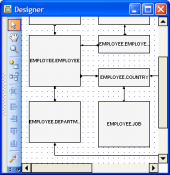
To get an OLAP cube, enter SELECT query as a snowflake schema, represented by centralized fact tables (with numeric data) which are connected to multiple dimensions (the numeric data to be categorized by). Input the query text in the SQL Editor area directly or use "drag-n-drop" operation SQL Editor or Visual Query Builder areas and the Query tab of Data Analisis.


Prev Return to chapter overview Next